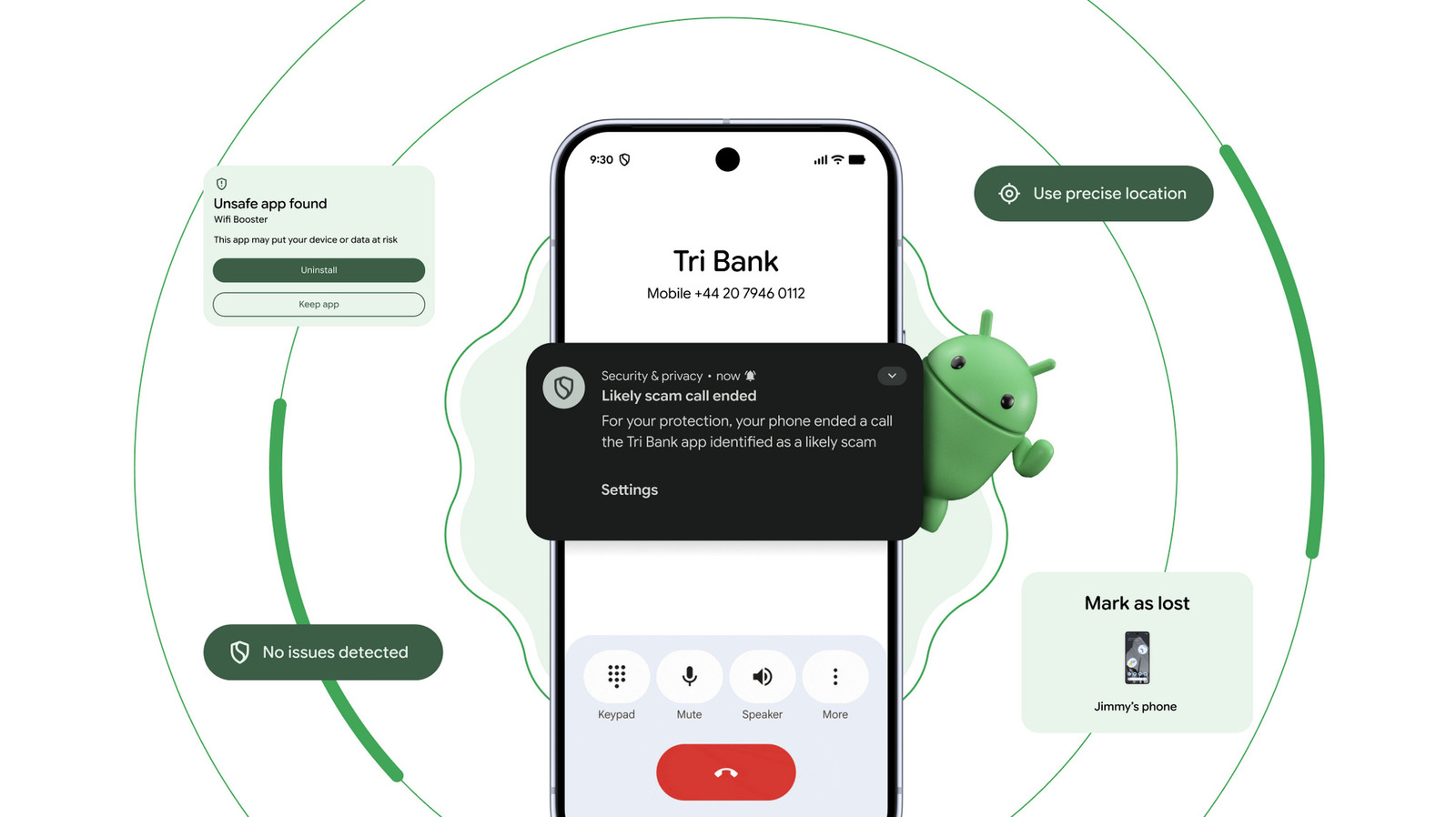
Google is bringing new security tools to Android phones to fight banking scam calls, a problem that hits Ghanaian mobile money users hard. The company announced the updates at its Android Show: I/O Edition event on May 12, 2026, and some features are rolling out in the coming weeks.
What is the new banking scam call protection?
Here’s the problem it solves: scammers pretend to be your bank and call you to steal login details or money. They use spoofing technology to make the fake call look like it’s coming from your actual bank.
Google’s solution is straightforward. On Android 11 and newer phones, a new feature will automatically block calls from numbers pretending to be your bank. When it blocks one, you’ll get a notification telling you that you likely dodged a scam call.
The catch? Google is only working with a few banks right now: Revolut, Itaú, and Nubank. It says it will add more banks “later this year,” but hasn’t named which ones yet. If your bank isn’t on the list yet, the feature won’t help—yet.
Why this matters for Ghanaians
Banking scam calls are a real problem in Ghana. Scammers target mobile money users and bank customers, asking for PINs, passwords, or account details. This tool would help protect anyone with a participating bank from those calls.
The bigger question: will Ghanaian banks join the program? That’s still unclear. You should check with your bank to see if they’ve partnered with Google.
Other Android security updates coming
Google also announced three other security tools:
- Smarter app scanning: A feature called Live Threat Detection will catch apps that try to scam or abuse you. It watches for tricks like SMS forwarding (sending your texts somewhere else) and fake accessibility permission abuse. This hits Android 17 devices later this year.
- Better theft protection: If your phone is stolen, a new failed authentication lock will prevent thieves from using it. They’ll need your fingerprint or face to unlock it, even if they know your passcode. This becomes the default on new Android 17 phones.
- Location privacy: Apps won’t get to track your location forever. You can now set a timer to share your exact location only while an app is open—useful for finding a nearby cafe without giving the app permanent access.
When will these arrive in Ghana?
The scam call blocker rolls out “in the coming weeks” to Android 11 phones and newer. The other features depend on whether you have Android 17 (the newest version). If you have an older phone, you may not get all these tools.
Check your phone’s settings to see which Android version you’re running. Go to Settings > About Phone > Android Version.
What you should do now
Keep your phone updated to Android 11 or newer. Watch for the update notification in the coming weeks. If you use mobile money or online banking, ask your provider if they’ll join Google’s anti-scam program. Until then, stay alert: never share your PIN or password over a call, even if the caller ID looks real.
Leave a Reply